
UIDAI to Retire mAadhaar App Soon: How to Register on the New Aadhaar App with Face Authentication and Digital Verification
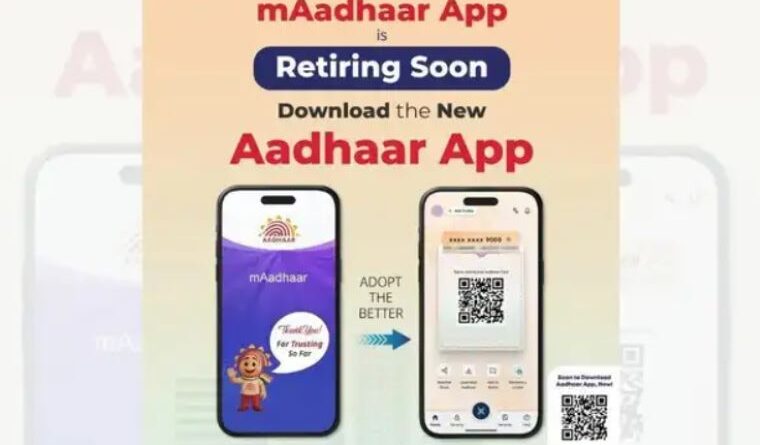
The Unique Identification Authority of India (UIDAI) is preparing to phase out the popular mAadhaar app and replace it with a new Aadhaar application that offers enhanced security, digital verification, and advanced face authentication technology. The move is aimed at simplifying identity verification while strengthening user privacy and reducing dependence on physical Aadhaar cards.
The announcement has generated significant interest among Aadhaar users across India, as millions currently rely on the mAadhaar app to access their digital identity information. With the rollout of the upgraded Aadhaar app, users will gain access to a more secure and feature-rich platform designed to support India’s growing digital ecosystem.
Why Is UIDAI Retiring the mAadhaar App?
The mAadhaar app has served as a digital companion for Aadhaar holders for several years, allowing users to carry their Aadhaar details on smartphones. However, UIDAI has now decided to transition to a more modern platform that aligns with evolving digital security standards and user expectations.
According to reports, the new Aadhaar app is being developed with advanced authentication mechanisms, including facial recognition technology. The upgraded platform aims to provide a seamless and secure identity verification experience for users across various sectors, including banking, travel, hospitality, government services, and telecom.
The retirement of the mAadhaar app is part of UIDAI’s broader effort to modernize Aadhaar services and make digital verification faster, safer, and more convenient.
Key Features of the New Aadhaar App
The new Aadhaar app introduces several major upgrades that distinguish it from the outgoing mAadhaar application.
1. Face Authentication Technology
One of the biggest highlights of the new app is face authentication. Users will be able to verify their identity using facial recognition instead of relying solely on OTPs or physical documents.
This feature is expected to improve security while reducing the risk of identity fraud and unauthorized access.
2. Digital Aadhaar Sharing
The app enables users to share Aadhaar information digitally without submitting photocopies or printed documents. This digital sharing mechanism helps minimize misuse of personal information while offering greater control over what data is shared.
3. QR Code-Based Verification
The new app supports QR code-based identity verification. Organizations and service providers can scan the QR code generated within the app to verify Aadhaar details instantly.
This process eliminates the need for physical verification in many scenarios and significantly reduces paperwork.
4. Enhanced Privacy Controls
UIDAI has focused heavily on user privacy. Aadhaar holders will have greater control over the information they choose to share. Instead of exposing full Aadhaar details, users may be able to share only the necessary information required for a specific service.
5. Improved User Experience
The new platform is expected to feature a more user-friendly interface, faster performance, and simplified navigation compared to the existing mAadhaar app.
How to Register on the New Aadhaar App
Users who wish to migrate to the new Aadhaar app can follow these simple steps:
Step 1: Download the New Aadhaar App
Visit the Google Play Store or Apple App Store and download the official Aadhaar app released by UIDAI. Users should verify that the publisher is UIDAI before installing the application.
Step 2: Open the App
Launch the application after installation and review the permissions requested by the app.
Step 3: Enter Aadhaar Details
Provide your Aadhaar number or Virtual ID (VID) when prompted during the registration process.
Step 4: Complete OTP Verification
An OTP will be sent to the mobile number linked with your Aadhaar. Enter the OTP to verify your identity.
Step 5: Set Up Face Authentication
The app may request access to your device camera. Follow the on-screen instructions to complete face authentication by capturing your facial image.
Step 6: Create Security Credentials
Users can create a PIN, password, or biometric lock depending on the options provided within the app.
Step 7: Access Digital Aadhaar Services
Once registration is complete, users can access digital Aadhaar verification, QR code generation, profile management, and other Aadhaar-related services directly from the app.
Benefits for Aadhaar Users
The new Aadhaar app is expected to deliver several advantages for users:
- Faster identity verification.
- Reduced need for physical Aadhaar cards.
- Enhanced privacy protection.
- Secure digital document sharing.
- Convenient access to Aadhaar services.
- Improved fraud prevention through facial authentication.
These features are especially important as India continues expanding digital services across public and private sectors.
What Happens to Existing mAadhaar Users?
Current mAadhaar users are expected to transition gradually to the new Aadhaar platform. While UIDAI has announced plans to retire the mAadhaar app, users should monitor official UIDAI notifications for exact timelines regarding the discontinuation process.
Users are advised to ensure that their Aadhaar-linked mobile numbers remain active, as OTP verification continues to play a key role in account setup and identity confirmation.
The Future of Digital Identity Verification in India
The launch of the new Aadhaar app represents another major step in India’s digital transformation journey. By integrating facial recognition, QR-based verification, and privacy-focused digital sharing, UIDAI aims to make Aadhaar authentication more secure and user-friendly.
As government agencies, banks, telecom operators, and service providers increasingly adopt digital verification systems, the new Aadhaar app could become a central tool for identity management across the country.
For millions of Aadhaar holders, the transition marks the beginning of a more secure and convenient digital identity experience, reducing paperwork while strengthening protection against identity theft and fraud.